Changelog
Konvo AI Setup Assistant
When a response misses the mark or doesn't feel quite right, fixing it is now 10x easier than ever before. Instead of going to your AI Settings, click "Improve Answer" directly on the message and chat with the AI Assistant to correct it. Describe what was wrong: whether it's the tone, a process that wasn't fully correct, or missing information, and it builds an action plan showing exactly what to change and why. You approve. Done.
We've also made the Assistant easy to find from the Knowledge Hub and Processes, and capable of creating custom answers and processes directly from your input. For instance, you can upload an internal document with all of your team’s procedures and ask it to set it all up in Konvo.
Your AI Assistant will analyze the content and create a plan to build it. Once you approve it, all processes will be automatically created and set to “disabled” so you can review and activate them.
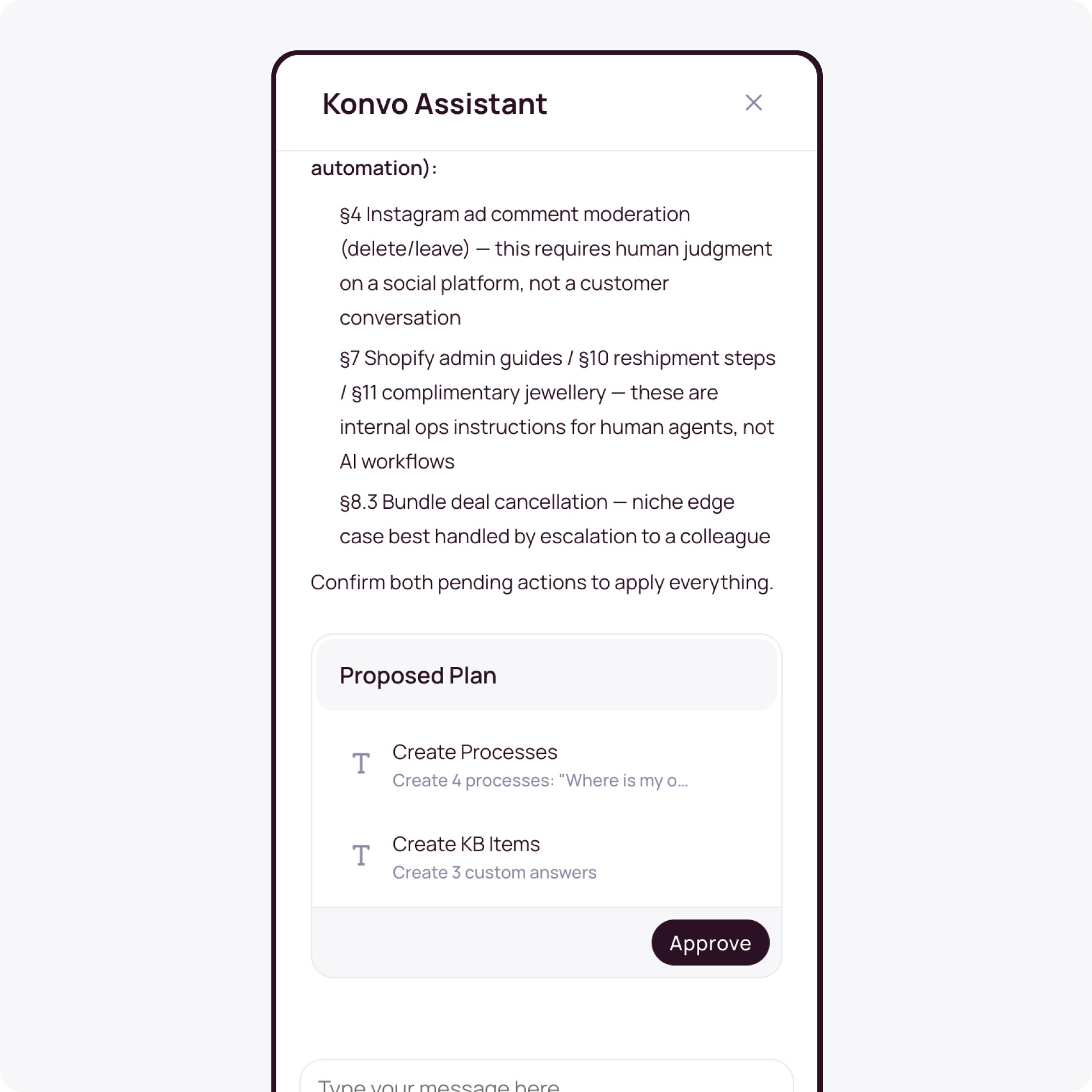
The result: a much easier way to train and improve your AI Agent. Without leaving the inbox, without technical knowledge, and without digging through settings.
Configurable Dashboard UI
Your support metrics, your way.
The analytics dashboard is now fully customizable. You can configure the layout, choose which metrics are front and center, and remove everything else. New reports and performance views will soon be included, giving you more visibility over your customer interactions and agent performance.
OTP & Verified Channel Security
You now have full control over when verification kicks in: never, only when identity is implicitly confirmed, or always. And you can configure this per action: checking order status might need no verification, while cancelling an order always triggers OTP.
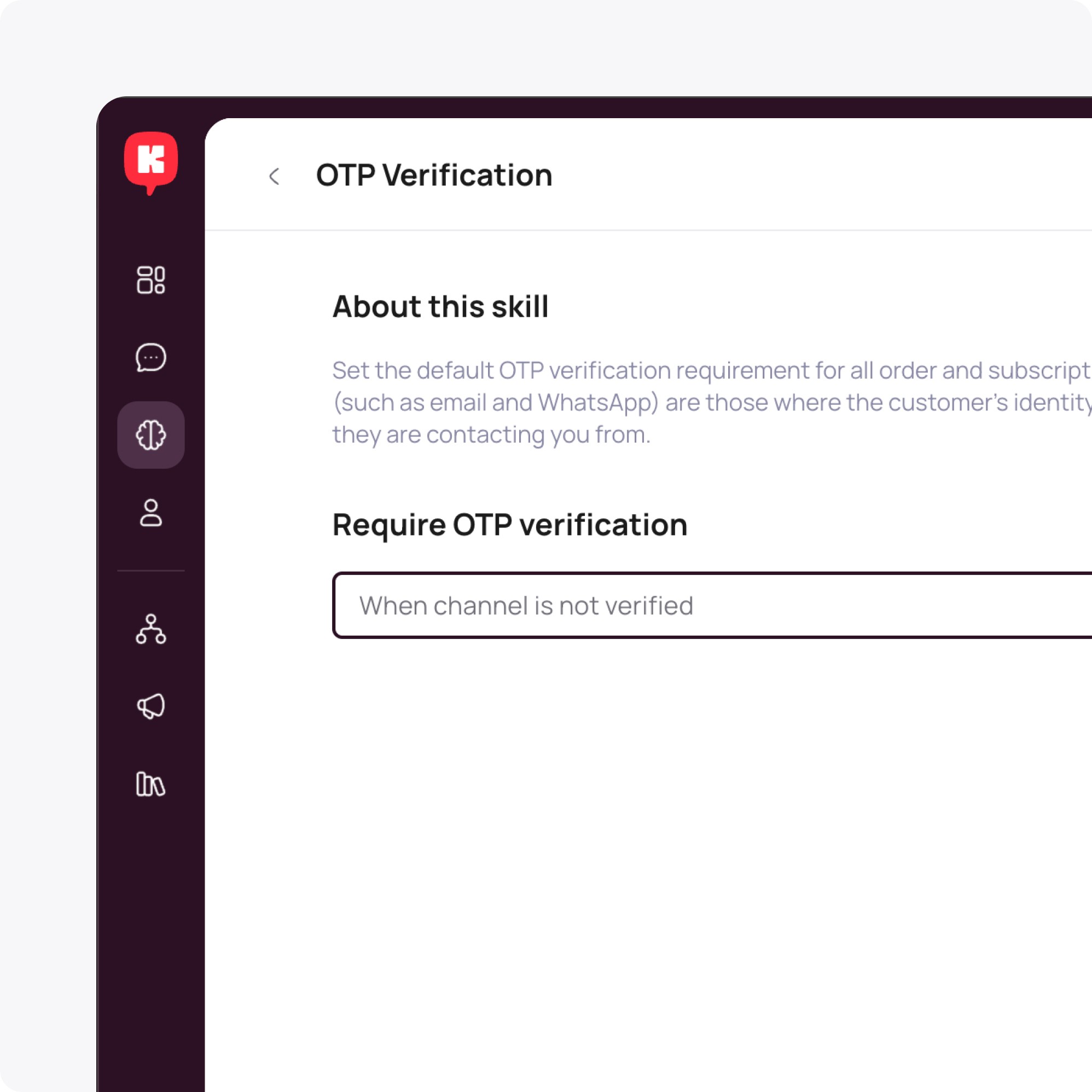
When a customer contacts your AI Agent from a verified channel like the same email address used to place an order to edit their shipping address, there is now a setting to confirm their identity with no OTP needed. Avoiding repetitive back and forth interactions, and making it is smoother for the customer.
However, if you want you can continue to request the OTP, it’s all up to you.
Improved Multilanguage Support
Customers contact brands in the language that feels natural to them. Spanish, Catalan, French, German... We’ve made upgrades in our infrastructure to improve how your AI Agent handles multilingual conversations in niche languages such as Catalan.
AI Knowledge Re-sync
Keep your AI Agent up to date at any time. If you update a page on your website, you can now trigger a manual re-sync with a single button, and the AI will immediately start working from the latest version of your content. No waiting for the next scheduled sync.
Product Recommendations
Your AI Agent can now suggest out-of-stock products if you need to. Before, all out-of-stock items were directly excluded from recommendations, making it inconvenient for businesses that run on pre-orders. A simple setting in your recommendations lets you change this behaviour.
Improvements
(AI Agent) Speech-to-text for the voice assistant now streams in real time, reducing response latency.
(AI Agent) Knowledge sources such as websites can now be updated at any time, by manually triggering a re-sync.
(Inbox) WhatsApp conversation expiry countdowns are now visible in the inbox header. Sending messages to closed WhatsApp conversations is blocked, with a direct link to any open conversation with the same contact.
(Inbox) Conversation lists now support infinite scroll. Contact detail pages paginate through the full conversation history.
(Inbox) Conversation cards in the inbox and contact sidebar have a refreshed design, with updated channel icons and a cleaner layout across all card types.
(Inbox) Instagram messages can now be replied to directly, with the original message shown for context.
(Inbox) The message composer has a refreshed UI for a cleaner writing experience, especially in Email.
(Notifications) You can now enable email alerts for open conversations. Konvo will email you every 30 minutes if there are unread open conversations waiting for your attention.
Fixes
(AI Agent) The AI now detects hallucinated transfer attempts and self-recovers instead of getting stuck in a broken state.
(AI Agent) AI responses no longer include fabricated URLs. Appstle subscription address paths are also normalized correctly.
(AI Agent) Appstle subscription statuses are now surfaced accurately to the AI. Customers with unresolvable subscription states are referred to a human agent.
(AI Agent) Unsaved changes in the AI Process Editor are now preserved when toggling the enable/disable switch or switching browser tabs.
(AI Agent) Fixed crash when a recommendation group was undefined.
(AI Agent) Fixed OTP verification emails not being sent to specific addresses due to a compatibility issue.
(Email) Transfer emails now pass DMARC validation correctly under all circumstances, resolving delivery failures caused by authentication mismatches.
(Email) Gmail and Outlook inline images now render correctly in conversation threads.
(Platform) Data in the interface now always reflects the latest state of each conversation.
Smarter Product Recommendations
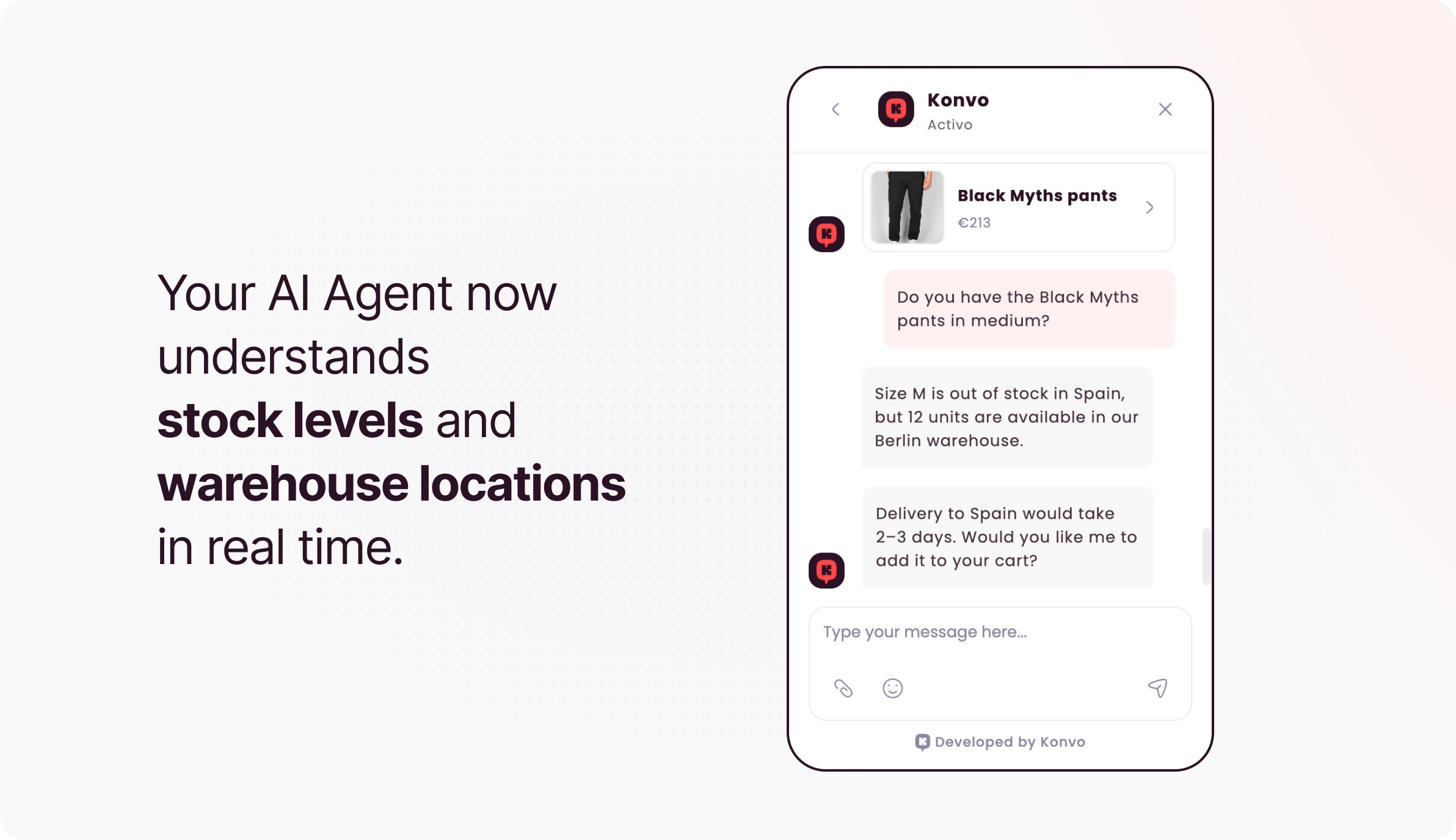
Your AI Agent just got a lot smarter about your products. We've completely rebuilt how Konvo handles product recommendations: results are faster and more accurate, and your AI Agent now understands stock levels and warehouse locations in real time. When a customer asks "do you have this in a medium?", the Agent doesn't just search, it checks the real availability across all your fulfillment locations and recommends accordingly. If you're asking from Spain about a product that is only available in Germany, now we know.
Improvements
(AI Agent) Vector database improvements significantly enhance product name search and similarity search accuracy
(Inbox) Conversation list counts now update in real time when items are added or removed
Fixes
(AI Agent) Private Quick Responses now correctly appear in both settings and the editor menu only for the agent that created it
(Email) Transfer emails now bypass automations and go directly to open feeds, preventing drops by email providers
(AI Agent) AI handover now correctly attaches conversation IDs during session closures
(Integrations) Fixed Zendesk email conversations the AI Agent incorrectly processed
(Integrations) Resolved deduplication on Gorgias’ WhatsApp messages preventing the same conversation from opening as multiple feeds
(Integrations) Resolved silent failures on Shopify webhooks and updated API from 2024-07 to 2025-01
(Platform) Fixed Knowledge Base single-link crawl functionality, ensuring only the selected URL is fetched
Connect your Custom Shop with your AI Agent
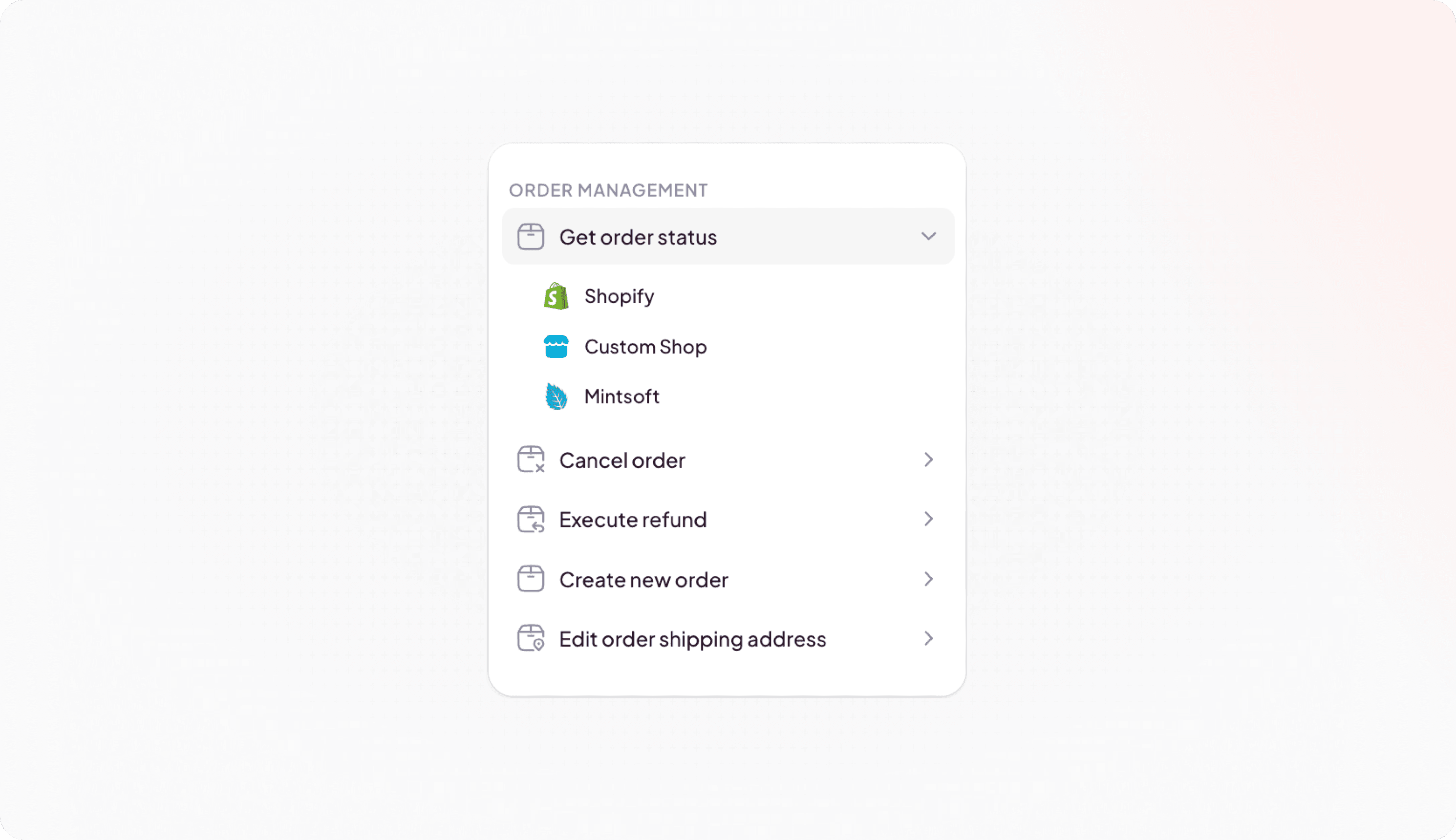
Now you can connect your custom shop system to Konvo and give access to your AI Agent to take actions on it.
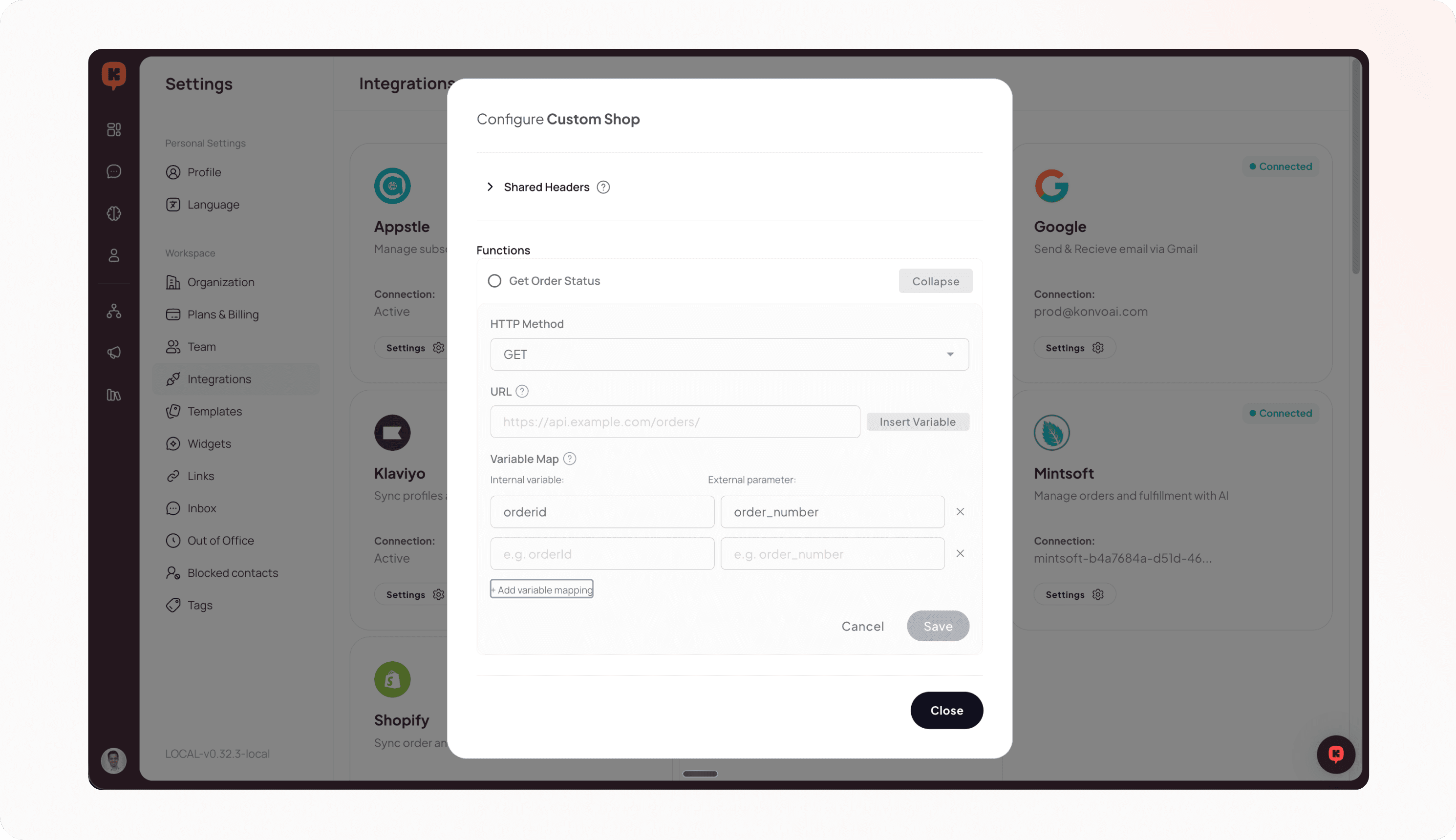
This empowers businesses using custom or niche ecommerce platforms to leverage the full power of Konvo's AI Agents without requiring pre-built integrations. You can configure custom webhook endpoints for order operations (refunds, cancellations, tracking updates), build custom integration functions that map to your specific shop API requirements, and use these directly in AI Processes.
Connect Byrd (3PL) with your AI Agent
If you use Byrd as your third-party logistics provider or have a completely custom shop infrastructure, you can now connect it with your Konvo AI Agent and let it handle order tracking and changes.
This integration expands our gives ecommerce businesses more flexibility in their logistics operations, enabling you to connect your Byrd account and automatically sync order information for fulfillment tracking, view Byrd tracking information in customer conversations, and more.
AI Processes are now out of Beta!
After a successful trial with 30+ customers, we are moving Processes to general availability for anyone to use and enjoy automating their most complex customer service workflows.
Together with this, we also release several additional improvements:
Added usage count tracking showing how many times each process is referenced
Improved UI for managing and organizing processes
Enhanced stability and error handling, and performance optimizations
Updated auto-resolve timer for AI Sessions
We updated the auto-resolve timer configuration to support minute-level precision instead of just hours. This provides more granular control over conversation lifecycle and better alignment with specific SLA requirements.
Improvements
(AI Agent) Implemented a comprehensive watchdog system to detect and recover from silent AI failures
(Audience) Deduplicates contacts automatically during csv uploads
(Inbox) Increased maximum image size for attachments from 5MB to 15MB for better quality support
Fixes
(AI Agent) Fixed issue where feeds could become stuck in an idle state, preventing proper conversation handling and agent assignment
(Inbox) Proper handling of both inline and attachment content types in Email
(Integrations) Fixed URL formatting issues when processing and prompting Gorgias outbound messages
Manage subscriptions directly with your AI Agent
Now your AI Agent can manage any subscription changes or updates you want, with the exact steps and instructions you need.
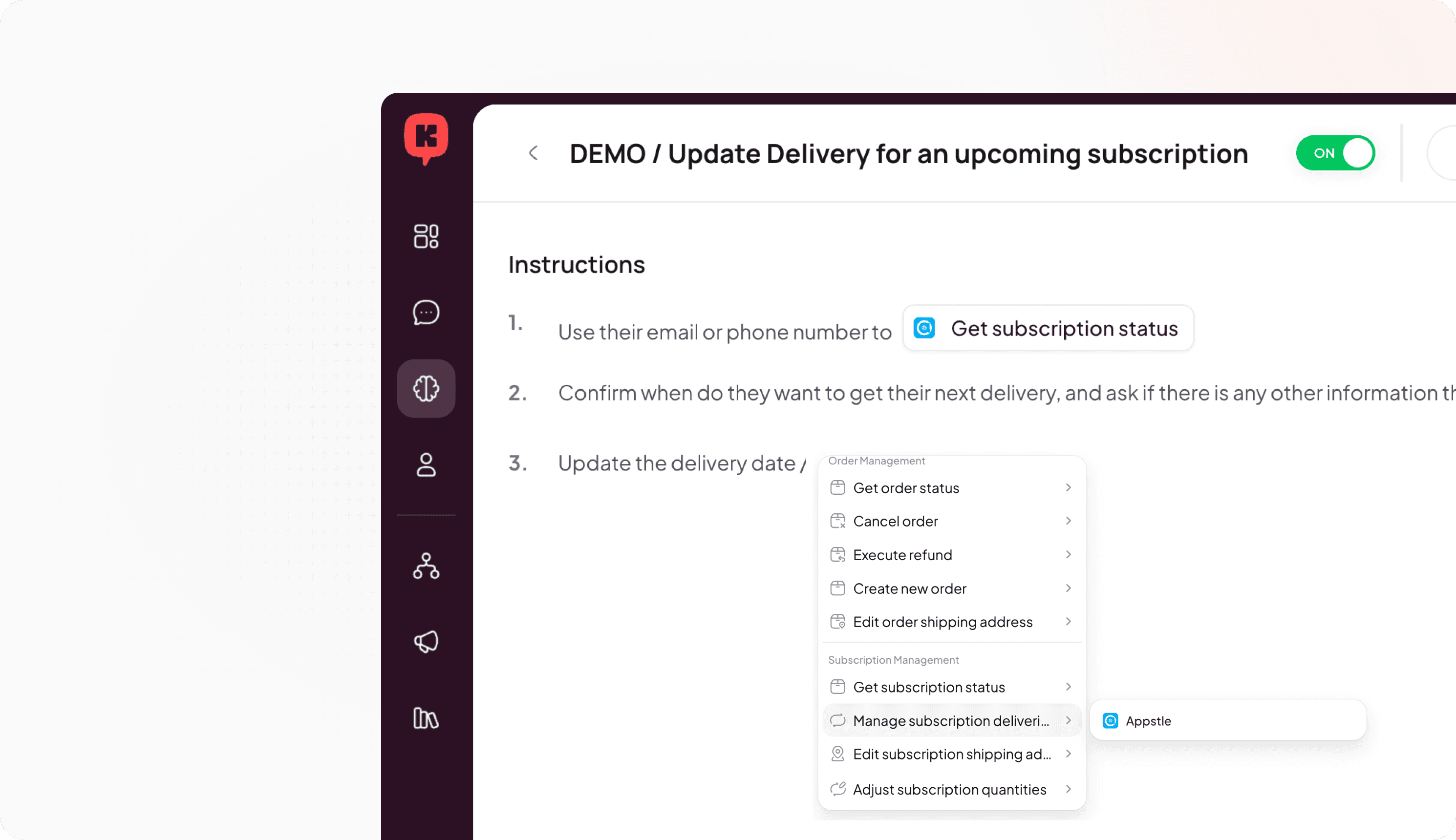
Teach your AI Agent how to manage subscription updates and let it handle all of your customer questions. For example, if a customer is going on holidays and needs to pause their subscription, now you can get your AI Agent to respond and help them skip the next delivery or update the shipping address to their holiday location.
Your AI Agent can manage delivery addresses, pause / skip / resume subscriptions, read all of the subscription information, and edit or modify the quantity of the products included in the subscription and even add new products. And it works for all subscription management platforms, such as Appstle, Recharge, Loop, Recurly, etc.
Quicker for your customers, better for your team.
Tag conversations directly with a process
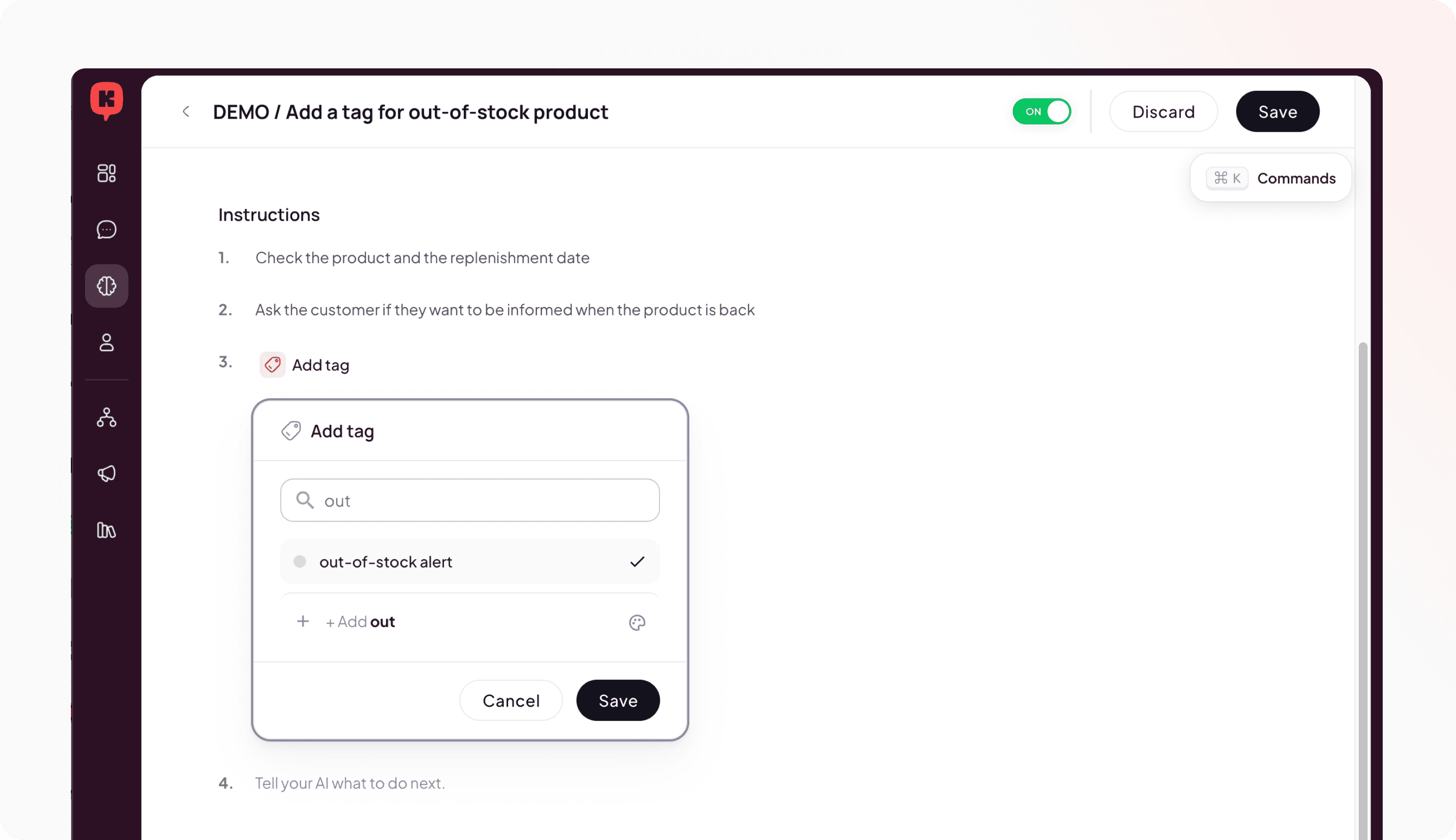
Sometimes you want to tag conversations to gather insights, highlight key customers, or simply improve your internal operations. Now your AI Agent can do all this for you.
Inside a process you can know very easily the tag to mark anything that is relevant to you. Use the “Add Tag” action, search for the right one or create it and you are done. It is that easy.
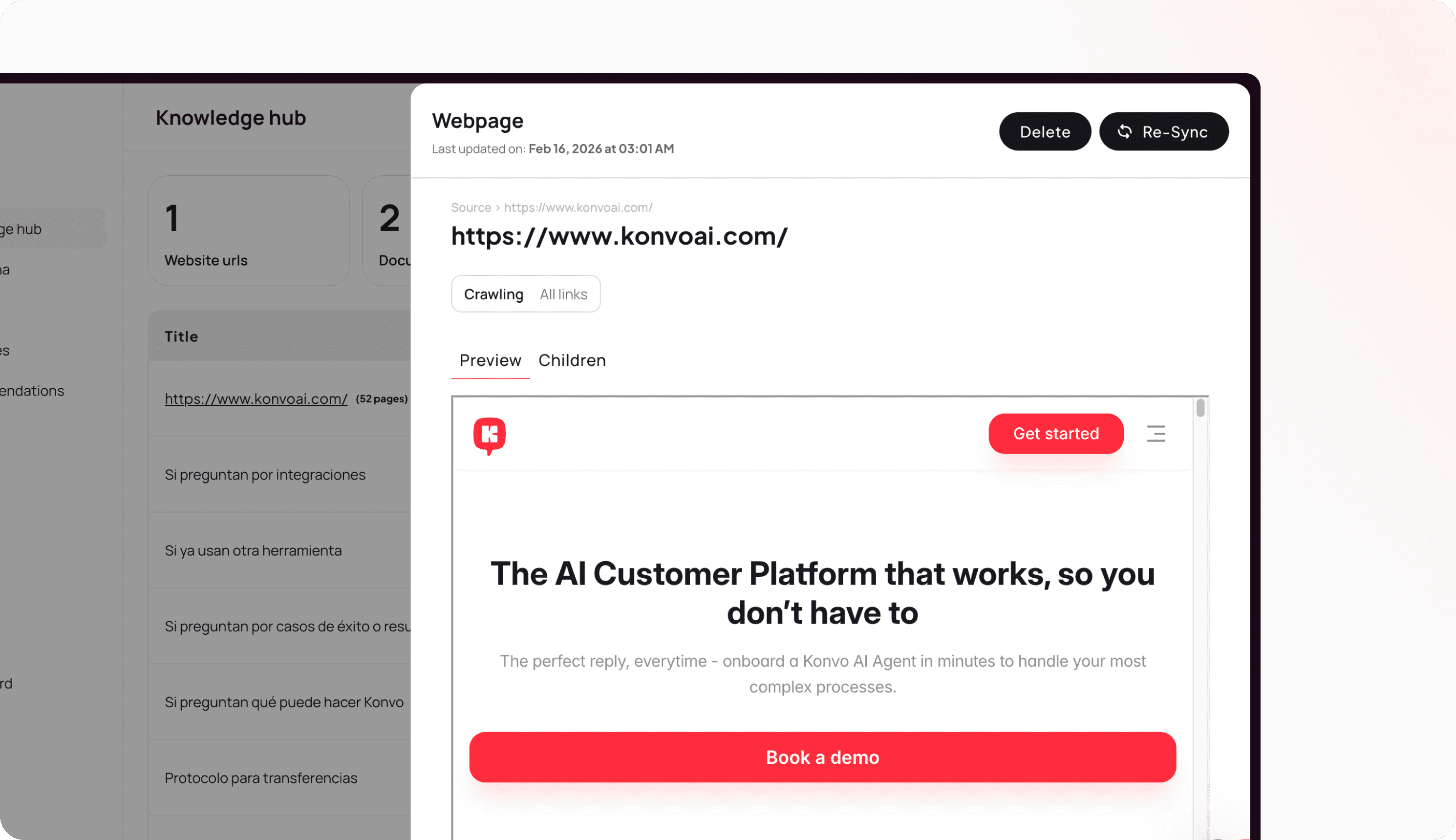
Websites in your Knowledge Hub automatically update
You upload a website with key information and your AI Agent learns it. In 2 weeks you update the content of the site but forget to re-sync your sources, making your AI Agent obsolete.
But you don’t have to worry anymore. Konvo now automatically re-syncs all your content every night to make sure your sources are always kept up to date. And you can also manually trigger a new sync if you need even more immediate updates.
Improvements
(AI Agent) Process validation warnings displayed as inline pills
(AI Agent) Action instructions in Processes now visible in Go-To menu
(AI Agent) New "Finish Process" control flow action for better completion handling
(Inbox) Better fallback logic for sender names from livechat
Fixes
(AI Agent) Fixed escalation bypassing email/WhatsApp transfer settings
(AI Agent) Prevented reactions from triggering AI requests
(Audience) "Does not contain" filter now displays correct contact counts
(Audience) Resolved NaN display issue with NOT_IN operations
(Platform) Resolved session verification with expired cookies
(Platform) No more unexpected redirects to login page
(Livechat) Fixed widget chat interface failing after email collection
Let your AI Agent share files and photos
Now your AI Agent can share files and photos while it helps customers.
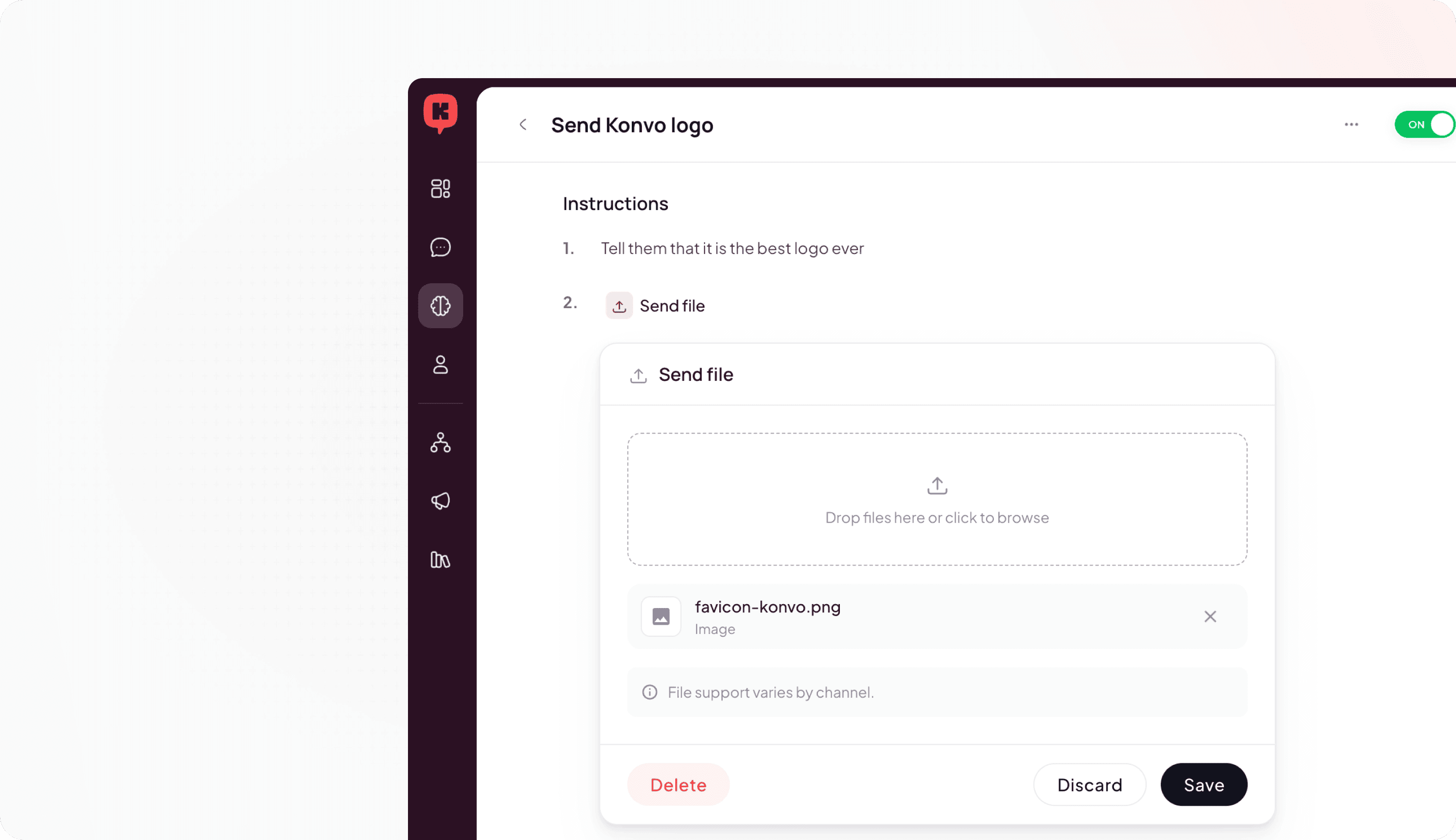
Create processes to teach your Agent how and when to share pictures or documents with your customers, and let it do the work for you. For example, a customer needs help measuring their ring size, you can now send them a measurement sheet they can print, or if they are struggling to fix their coffee machine you can send them a video showing how to troubleshoot it.
Customize what emails should your AI Agent ignore with a prompt
Not every email you receive is an email that should be handled by your AI Agent, now you can tell it what not to reply to like you would with a human - with a prompt.
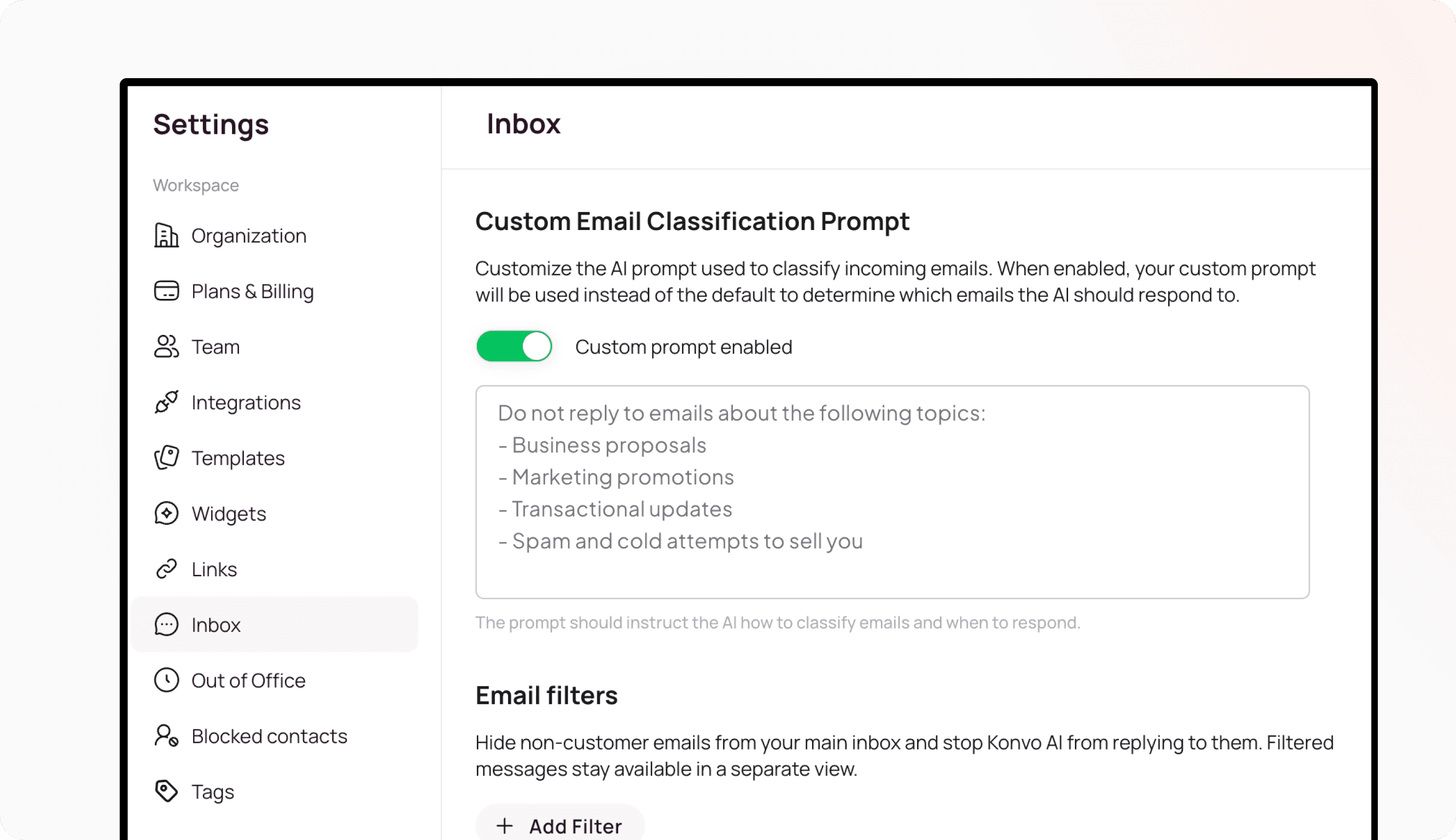
In configuration you can now customize what emails to ignore by giving examples or simply describing it. For example, if you want collaboration requests or B2B orders to go straight to your human team, you can just say so.
Create specific guidelines for complex product recommendations
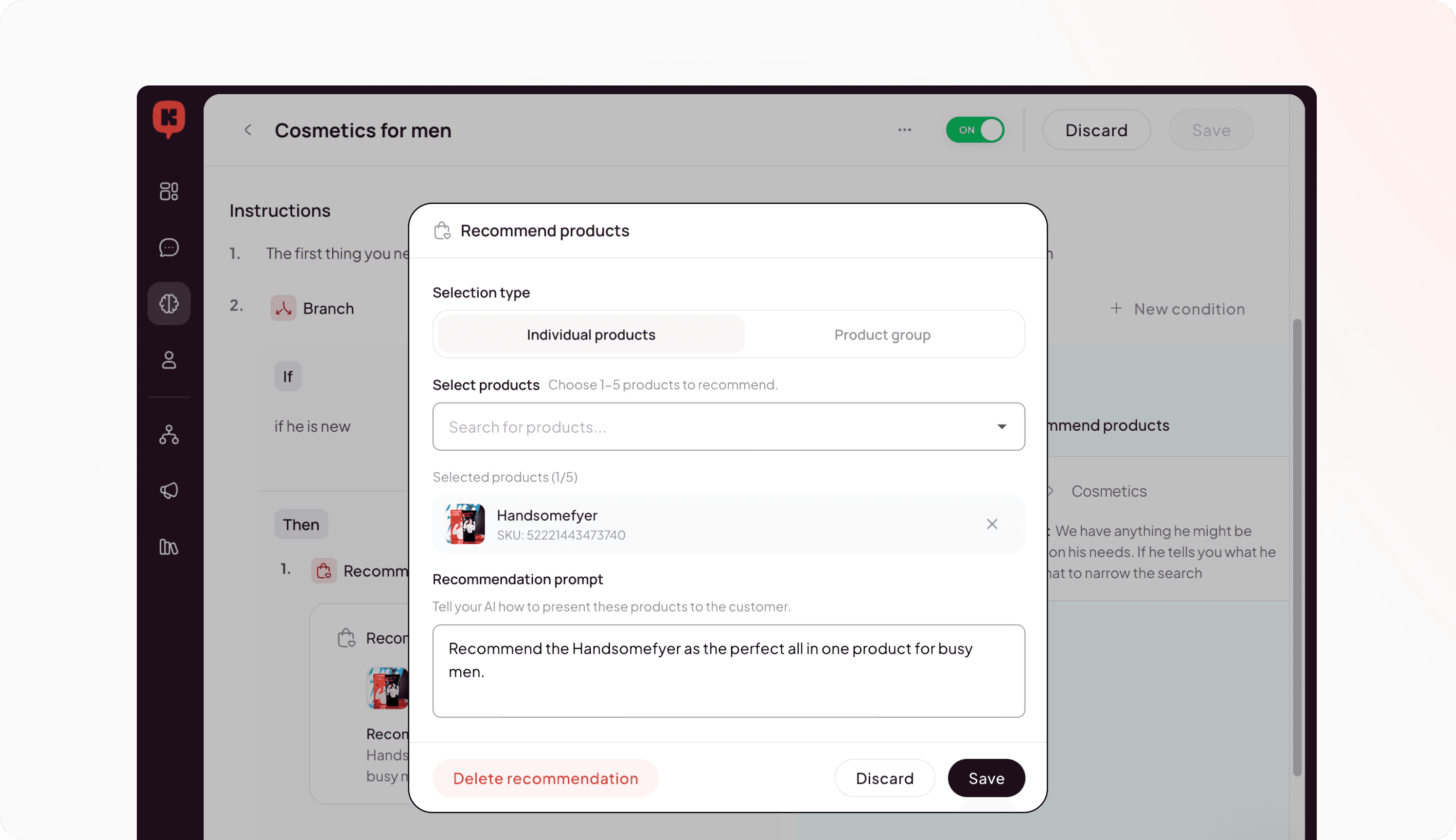
If you have specific products or use cases that are very complex and require very specialized handling, now you can give the specific instructions to know how to handle them to your AI Agent. For example, if you know that some of your customers confuse what lotion is best for them and this increases your return rate, now you can personalize exactly how the AI should recommend these. Like a sales assistant in your store, but 24/7.
If you don’t, your AI Agent will continue to recommend the best products possible based on all other available information from the customer and the store.
Let customers upload files in livechat
We’ve added the ability for customers to upload files when their are messaging you via livechat.
Configure your follow up prompts and resolution windows
Now you can add custom prompts for your AI Agent to follow up with clients in different ways based on the time of the day and channel.
You can also now configure how long should the AI wait after the customer goes inactive before marking the conversation as resolved. By default it is set to 24h, but you can make that shorter or longer according to your needs and business.
Improvements
(AI Agent) Added real-time visibility into product inventory across multiple shop locations
(AI Agent) Expanded context of the Agent to previous broadcasts and flow messages
(AI Agent) Updated system prompt to more accurately represent a sales assistant
(AI Agent) Improved schedule handling for automated messages
(Inbox) Added the ability to search and filter by contact specific variables
(Audience) Improved segment builder performance for faster filtering
Fixes
(AI Agent) Fixed AI message processing to properly handle media asset
(AI Agent) Fixed missing SKU label translation in product recommendations
(Inbox) Fixed error that caused tags and contact information to disappear
(Inbox) Fixed contact data loss during lazy-load pagination
(Inbox) Fixed an issue where feeds were not updated after agents are assigned
(Email) Fixed email attachments not correctly displaying
(Platform) Fixed error that redirected users to the dashboard after session expiration
(Platform) Resolved database query contention issues, improving performance and reducing timeouts.
AI Agent over Email, available for all providers
Your AI Agent can now be deployed on your Email, no matter what your provider is. With direct integration for Gmail and Outlook, and generic SMTP integration, every single provider is now a possibility.
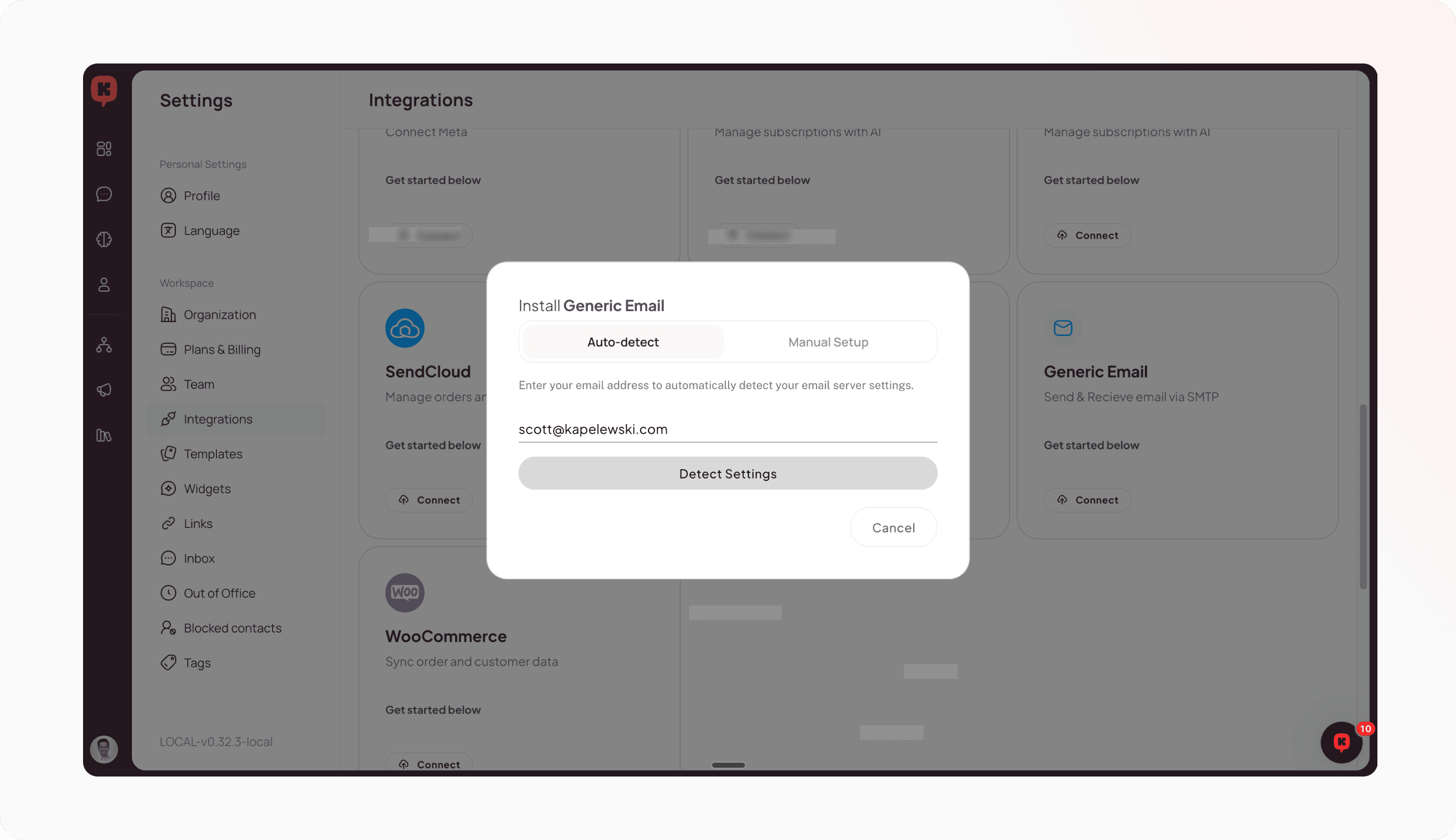
Email is the main communication channel for most brands, still representing the most common channel used by customers all across the world. After testing the impact of our AI Agent with 100+ customers over Gmail and Outlook, you now can take advantage of it no matter who is your provider.
To install it, you can manually setup your IMAP configuration, or let us autodetect all information for you in a second.
AI Processes now include Order Management skills for all integrations
Now you can create very advanced processes to automate any customer conversation around order management, canceling orders, exchanging orders, editing shipping information and more.
All of it works across Shopify, and your favorite 3PL and warehouse management systems: Mintsoft, Amphora, Bigblue, Sendcloud, etc.
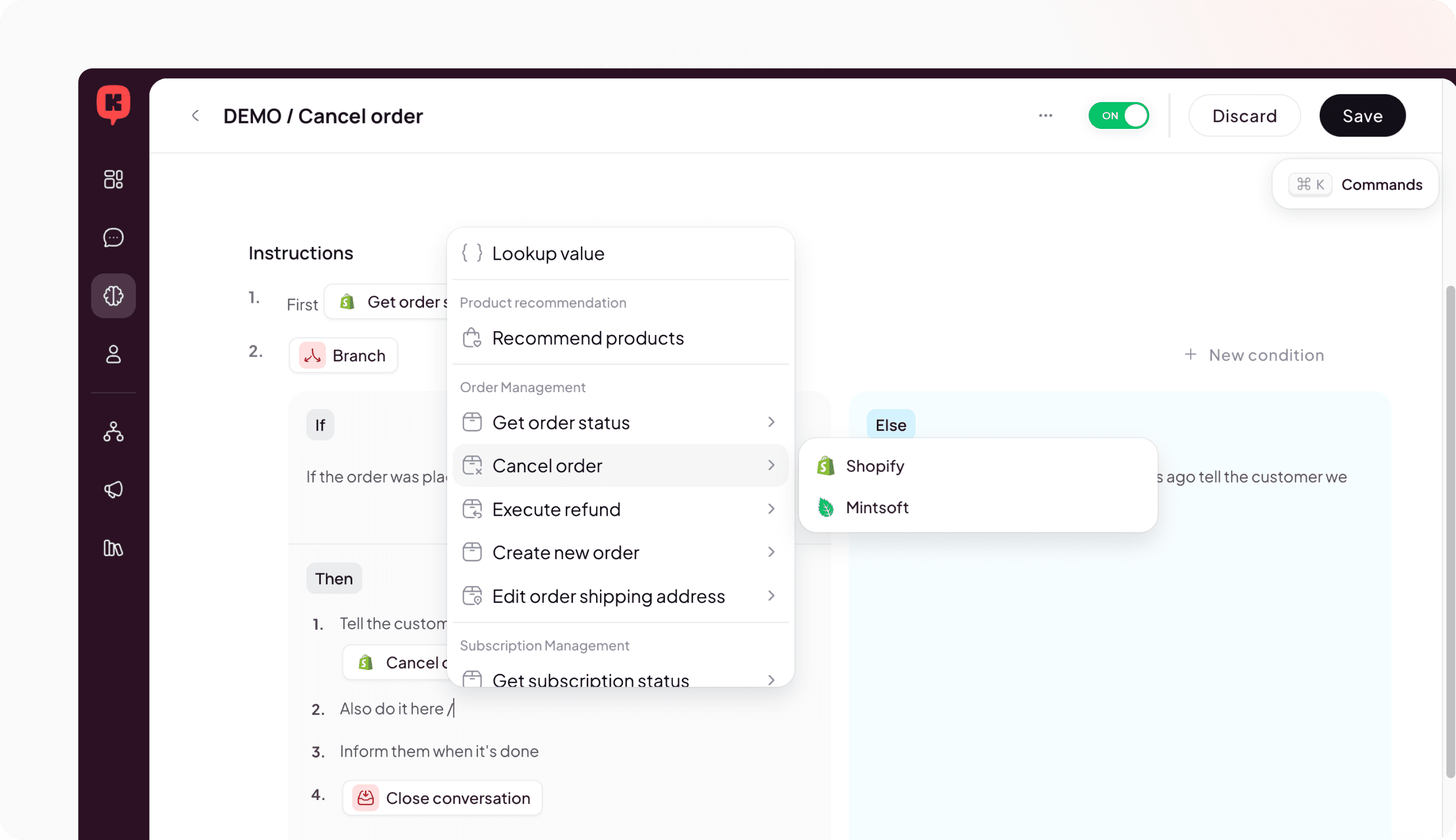
Sometimes, to properly process an exchange or update a shipping address, you need execute the update in different systems (e.g., Shopify, Amphora, etc) depending on what is the status of the order. With processes, you can describe these different situations and execute the action on the right system and at the right time.
Improved Order Details UI in the inbox
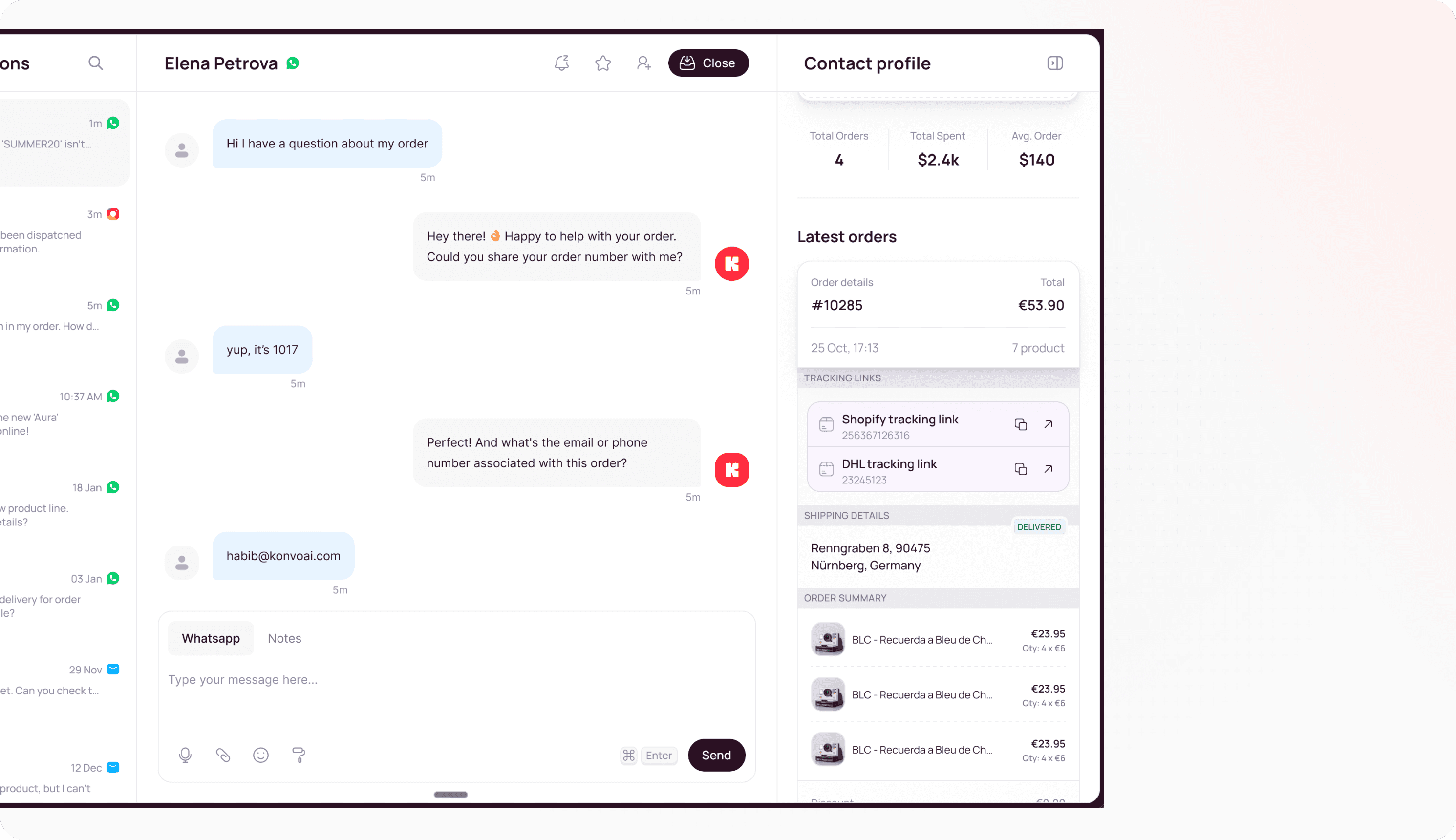
We have improved how order information is displayed on the contact panel in to make it easy to have all important data at a quick glance.
Now you can see all orders from that user, what products where included in the order along with all other key information, its shipping information and status, and access the tracking link from Shopify and the final courier.
Improvements
(AI Agent) Improved product synchronization and embedding pipeline for better search accuracy
(AI Agent) Improved product database performance for complex and slow queries
Fixes
(Inbox) Prevented accidental form submissions when clicking tab navigation buttons
(Email) Added proper styling for block / quote elements in email message bodies
(Email) Fixed @ symbol escaping issues in email-related translations
(Integrations) Integration channels automatically refresh after setup completion
(Integrations) Fixed errors in Gorgias integration
New Inbox search
Now you can search in your inbox based on contacts, messages, and even more advanced filters such as date or channel to make it easy to find exactly what you need.
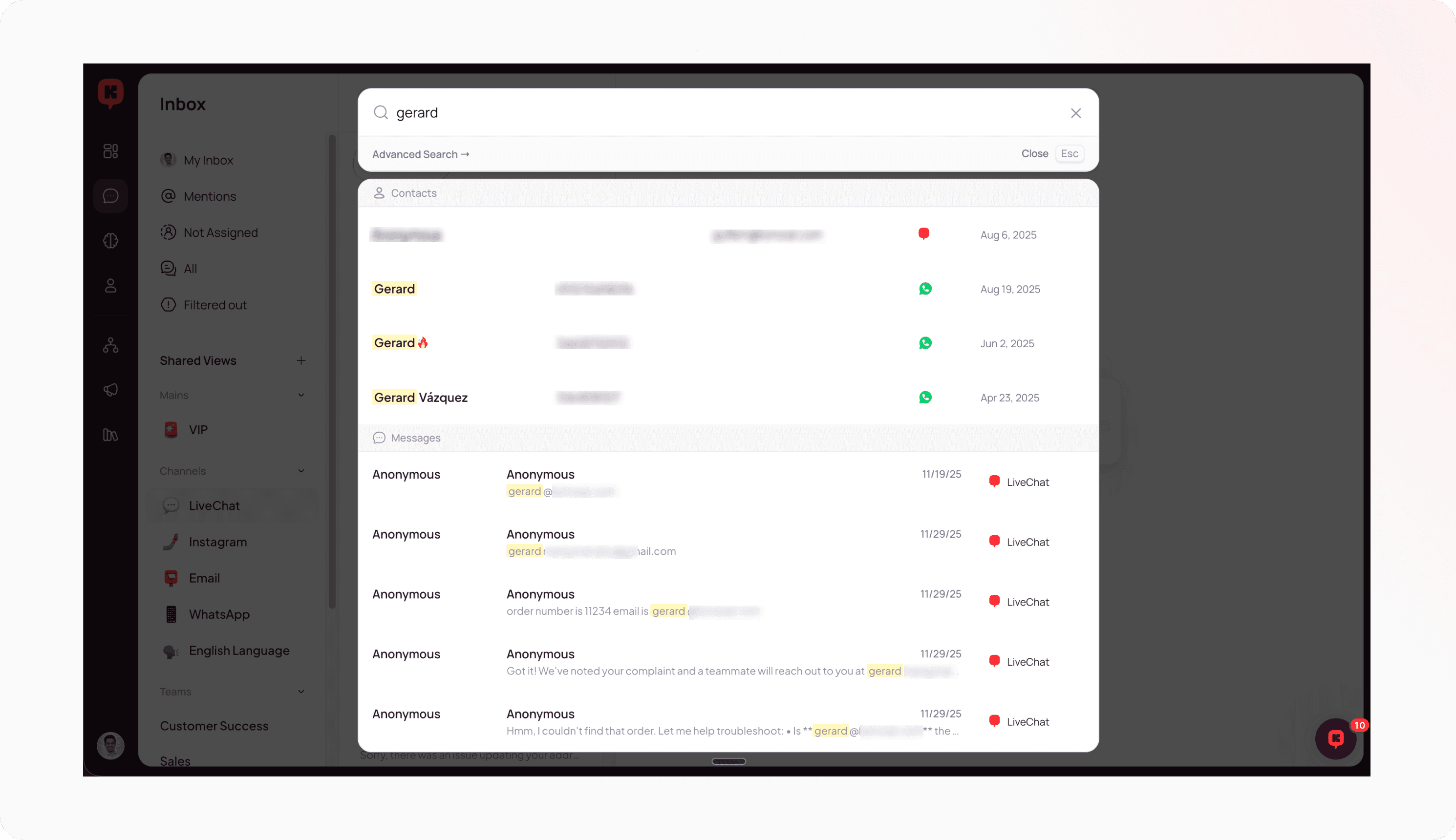
If you ever find yourself trying to remember who was the contact that asked about your new shirt, now you can clue together different pieces of information you remember to find it in 30 seconds without scrolling through old conversations.
Filter spam emails so they completely skip your inbox
Not every email you receive is useful and needs to be replied. In many cases, you might receive email confirmations, spam, or otherwise unwanted email.
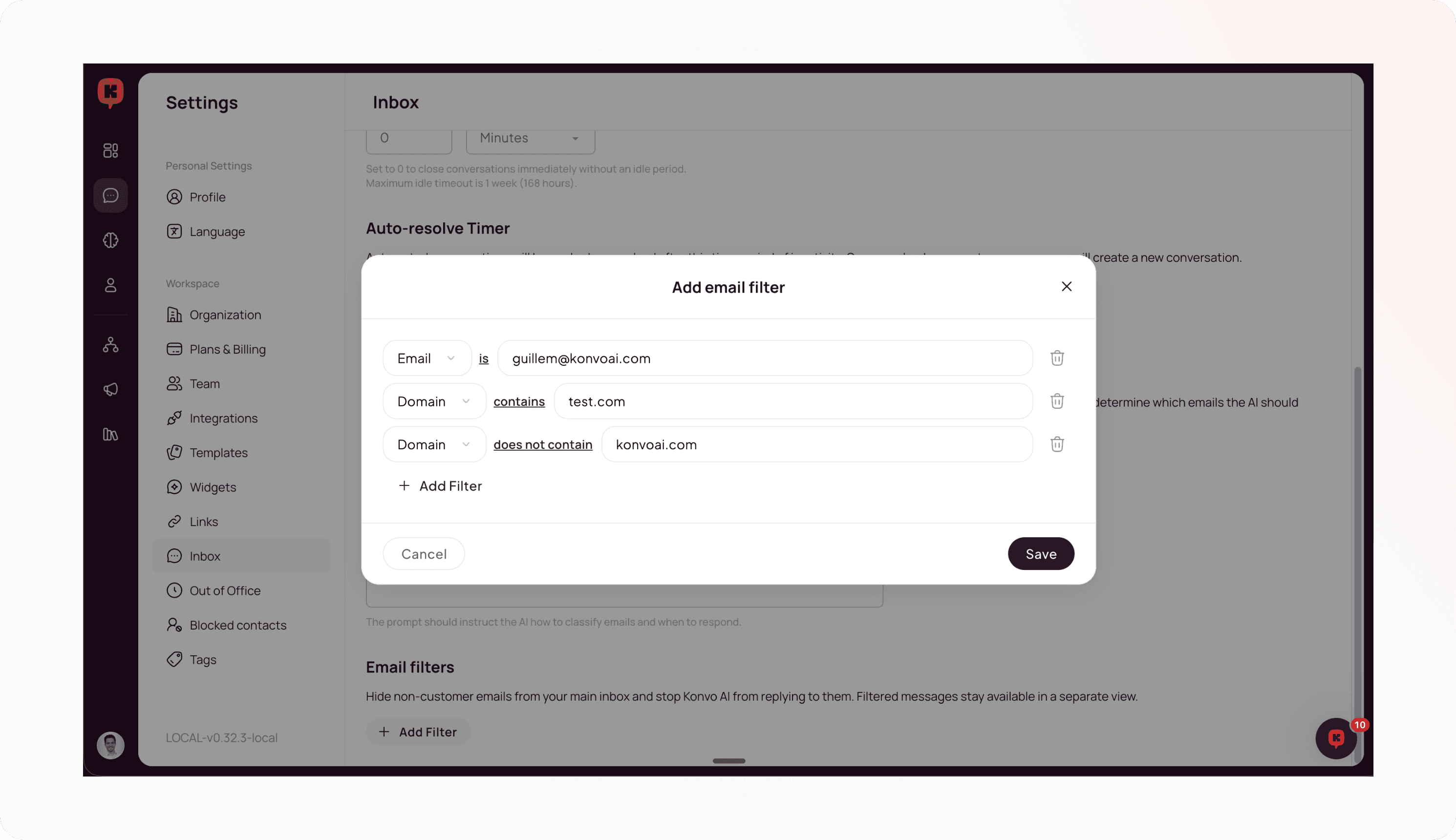
In your inbox configurations you can now set what emails or domains should skip the inbox. And do not worry, these are not lost or deleted, they automatically will be filtered in a specific view of your inbox.
Configurable idle state for closed conversations
Sometimes when your human agents are handling conversations, there are moments where you want to close the ticket so it disappears from your inbox but if the user replies back you still want the human to take it instead of the AI Agent.
For this, we have introduced a conversation state called “idle” during which any reply will open the conversation without going through the AI Agent. You can also configure how long this idle state should be in your configurations.
Improvements
(Inbox) Added the ability to perform bulk actions in the inbox, such as close or assign feeds in bulk
Fixes
(Inbox) Fixes for Reply-To Emails, when there are multiple email threads in an inbox
(Inbox) Fixes for duplicate feeds in Shared Views
(Audience) Improved handling for broadcast audience building + filters
Gather extra information with side conversations
Sometimes you need to contact your logistics partner, your warehouse, or a specific team member in order to fully resolve your customers’ issues. Now your AI Agent can launch a side conversation to do that and come back to the user once it got an answer.
This increases exponentially how many conversations you can resolve with your AI Agent.
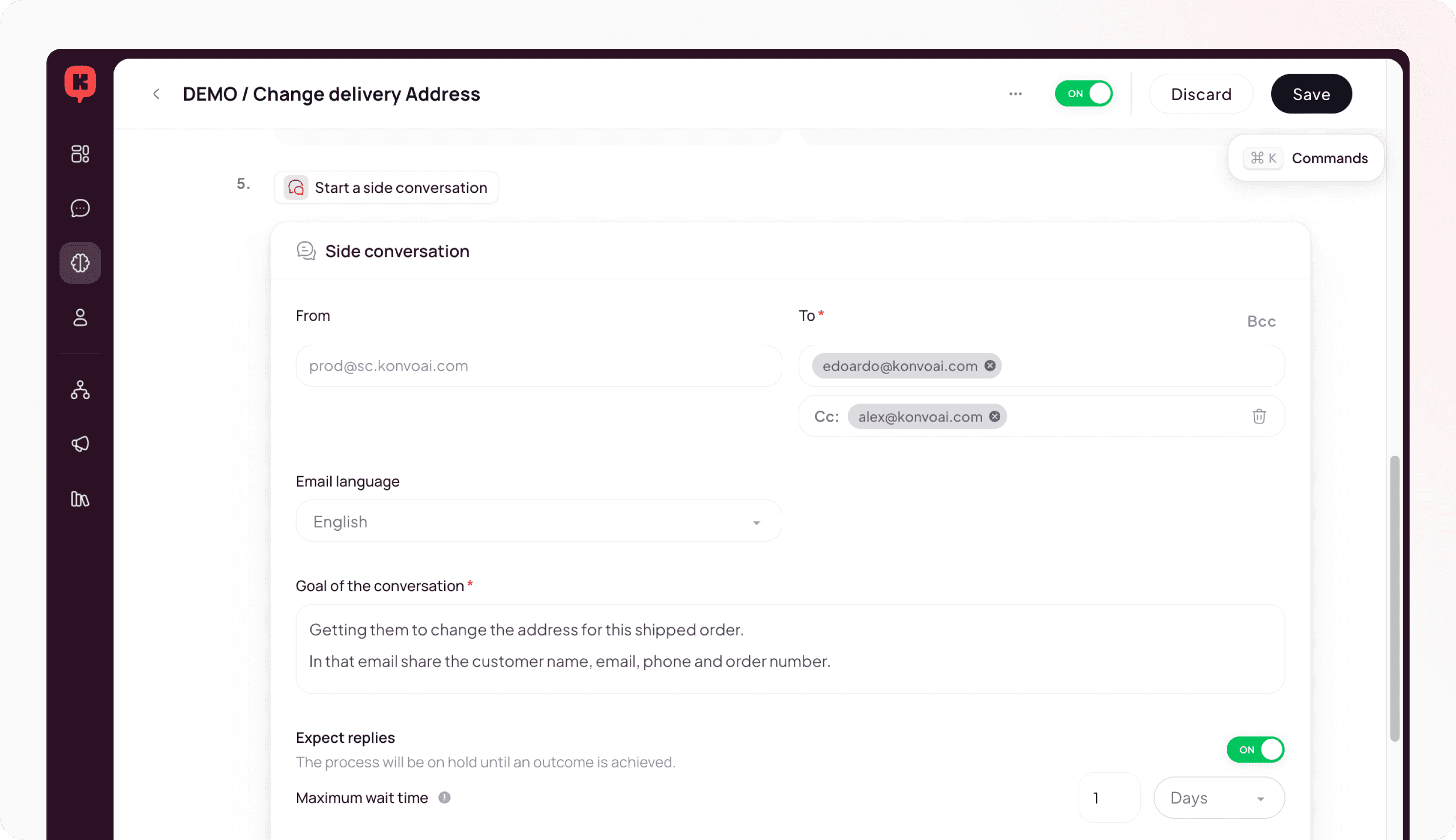
Imagine a customer asking you to update their shipping address when the order has already been picked up by the courier. This is an important order for a VIP customer, and you want to try to help them by contacting your logistics provider.
Now you can prepare a process that launches a side conversation with the goal of getting the courier to confirm if they can still process the change. Once the courier confirms, your AI Agent can continue the conversation with the customer to inform them.
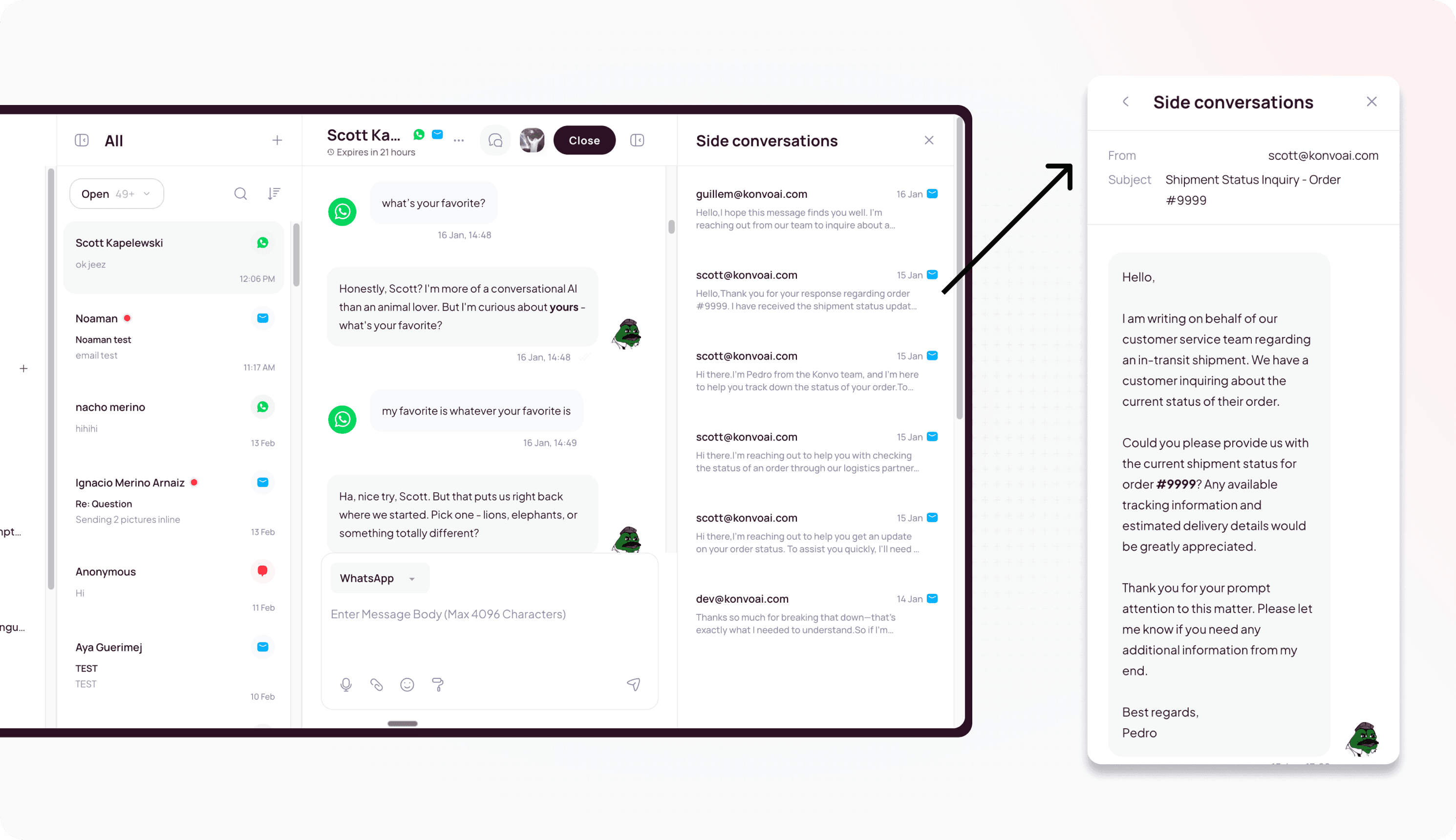
And with full visibility from the inbox, you stay in control.
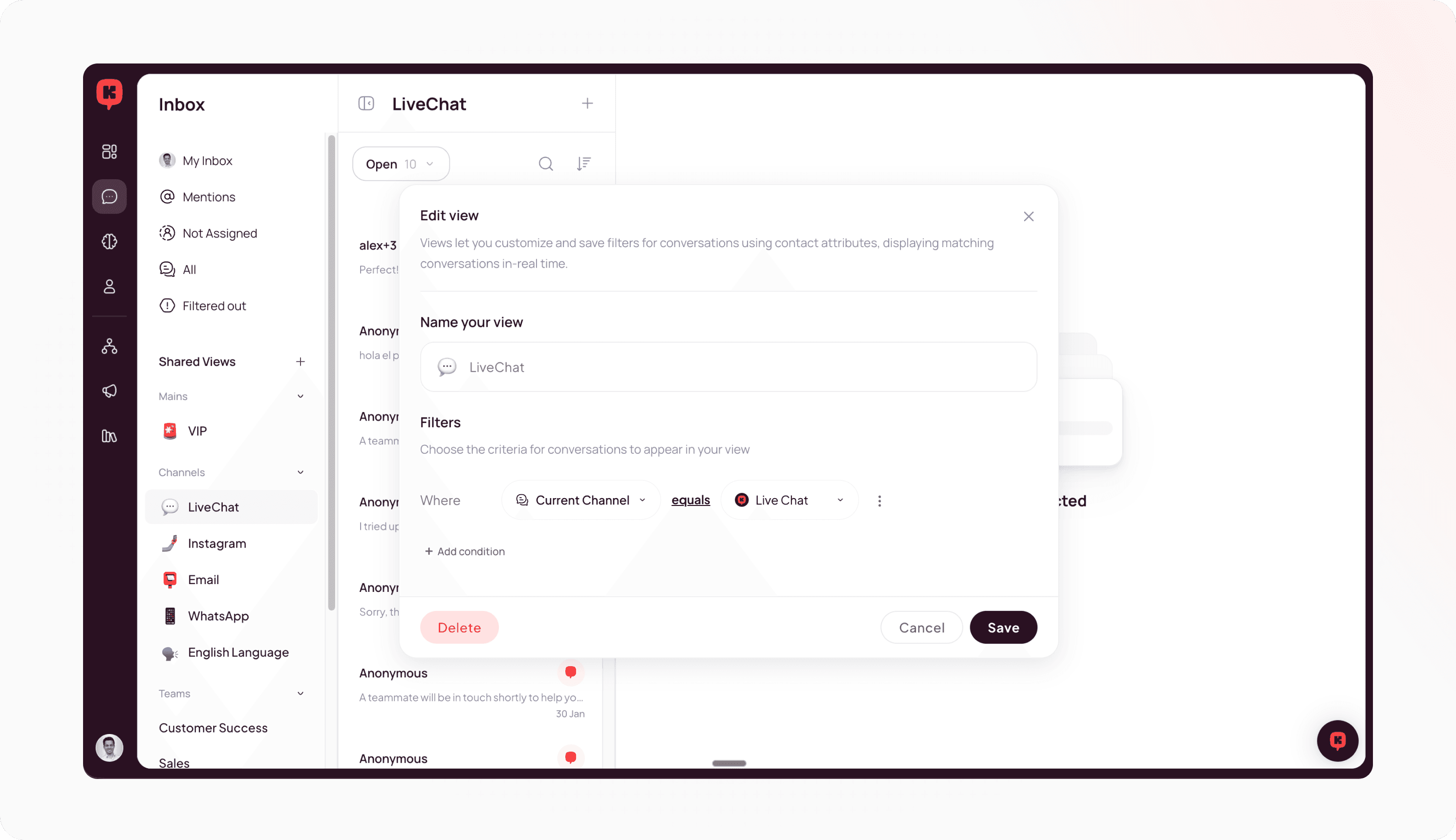
New and updated inbox views
Not every conversation is the same, and sometimes you want to organize them in different views for easier handling or to assign different team members to it.
Now you can create your own custom views and structure work to your needs.
Improvements
(Inbox) Images and videos open in a new lightbox with easier navigation.
(Inbox) Multiple attachments are now grouped cleanly in message bubbles.
Fixes
(AI Agent) Fixed en error affecting email replies for some specific customers
(AI Agent) Fixed temporary error causing AI summaries after hangover to not display
(Inbox) Minor display fixes in the feed list and widget sync